Volume
Analysis Assistant
The complete operator's manual for the assistant and its modules.
Reading the Assistant
01
Volume Profile
When you add Volume Analysis Assistant to your chart, a horizontal histogram builds from the left edge of the lookback window. Each row represents the volume traded at that price level. Longer bars mean more volume.
The profile spans the entire lookback window and recomputes as new bars confirm.
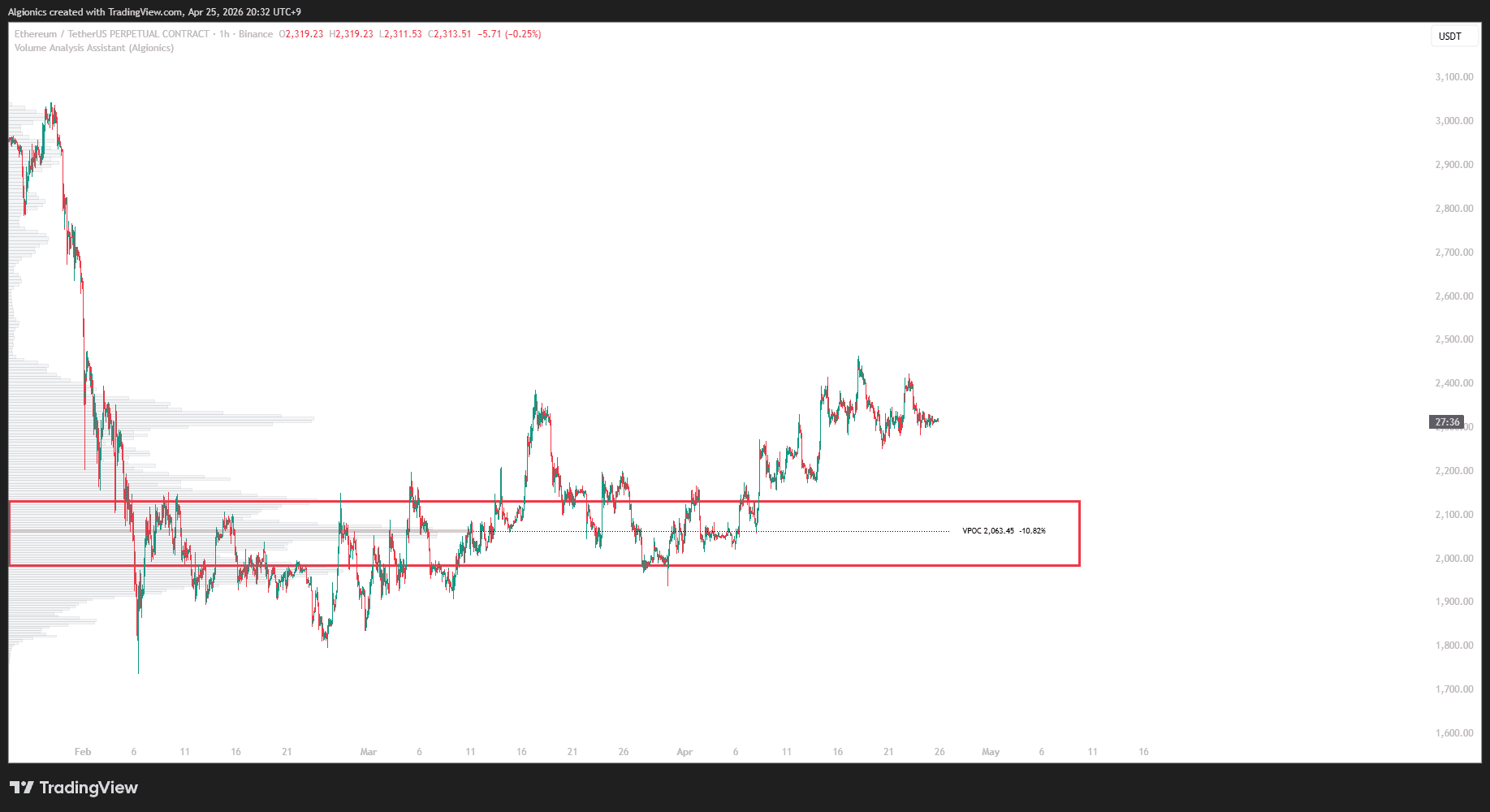
The row with the highest volume across the full window is the VPOC.
It is shaded with the current candle's directional color. Bull color appears when price closes above its open, bear color when below. This marks the active directional state at the most-traded price level.
Nodes
When nodes are enabled, the histogram is segmented into clusters. Each cluster is a node, a region where volume groups together, separated from neighboring clusters by valleys of low activity.
Boundaries are computed from the profile's own terrain. No fixed count is set.
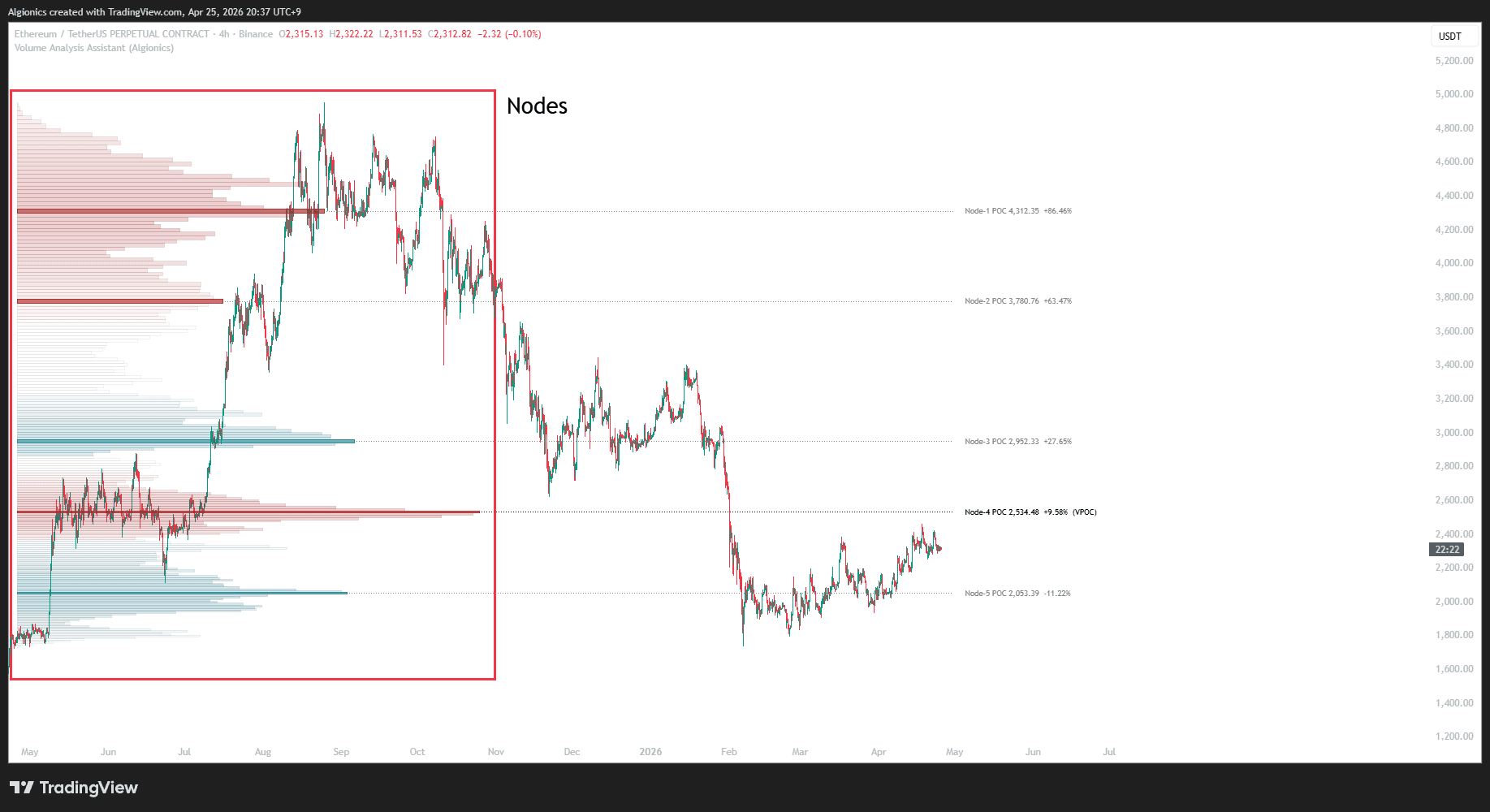
Each node is colored by its internal volume composition. Bull color appears when bull volume dominates inside the node. Bear color appears when bear volume dominates.
In gradient mode, bars fade as they move away from the node's peak. In solid mode, every bar inside the node holds full opacity.
Node POC
Each node carries its own POC, the highest-volume price level inside that node.
It is displayed with a dotted extension line and a label showing the exact price and the percentage distance from the current price.
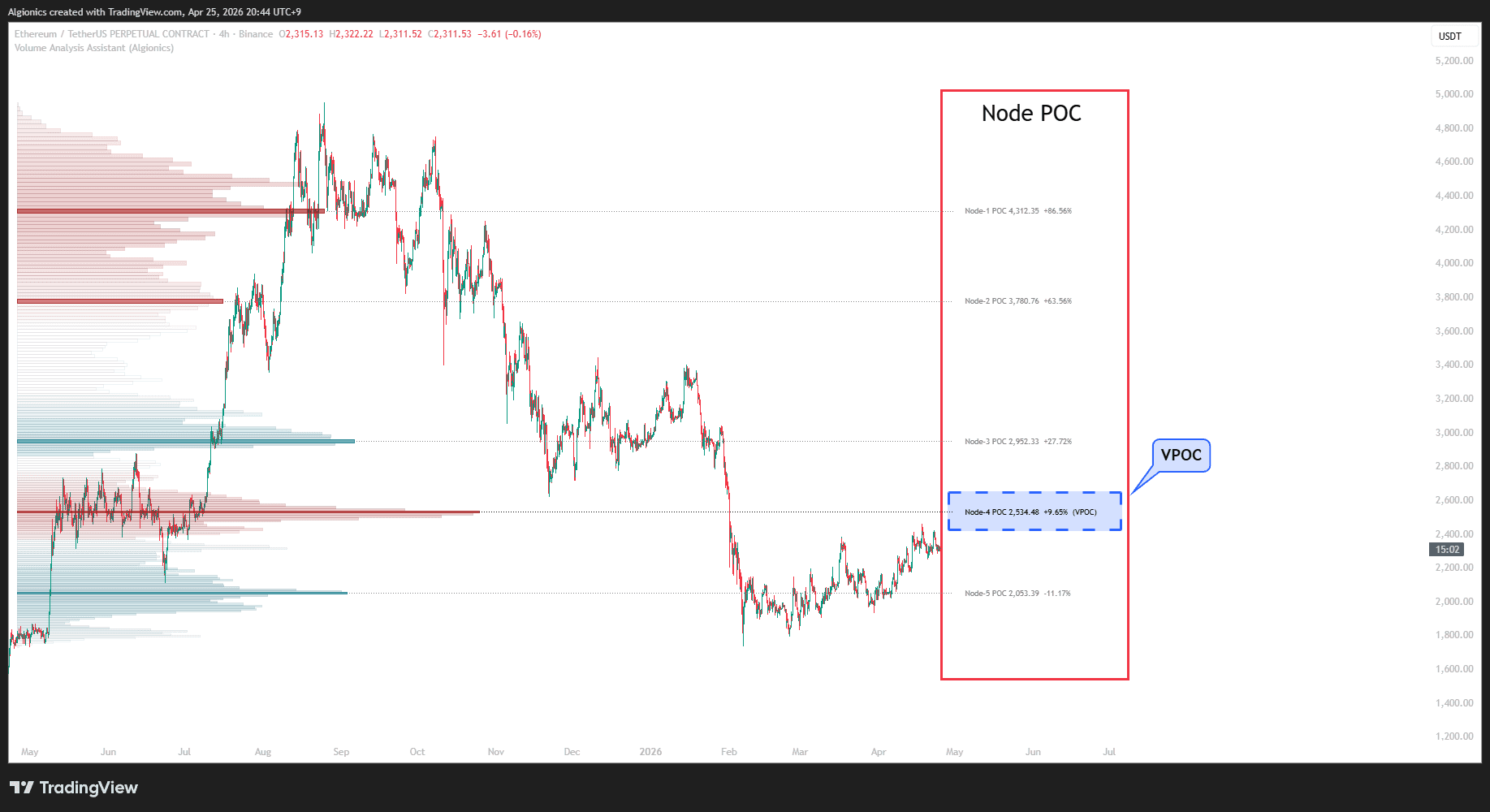
Nodes are numbered from top to bottom of the price range, so Node-1 is the highest.
When a node's POC is also the overall highest-volume level across the entire lookback window, the label appends (VPOC).
Value Area
The Value Area is the price range where the majority of volume is concentrated.
It is bounded by VAH at the top and VAL at the bottom, with the box itself shaded in a translucent fill across the lookback window.
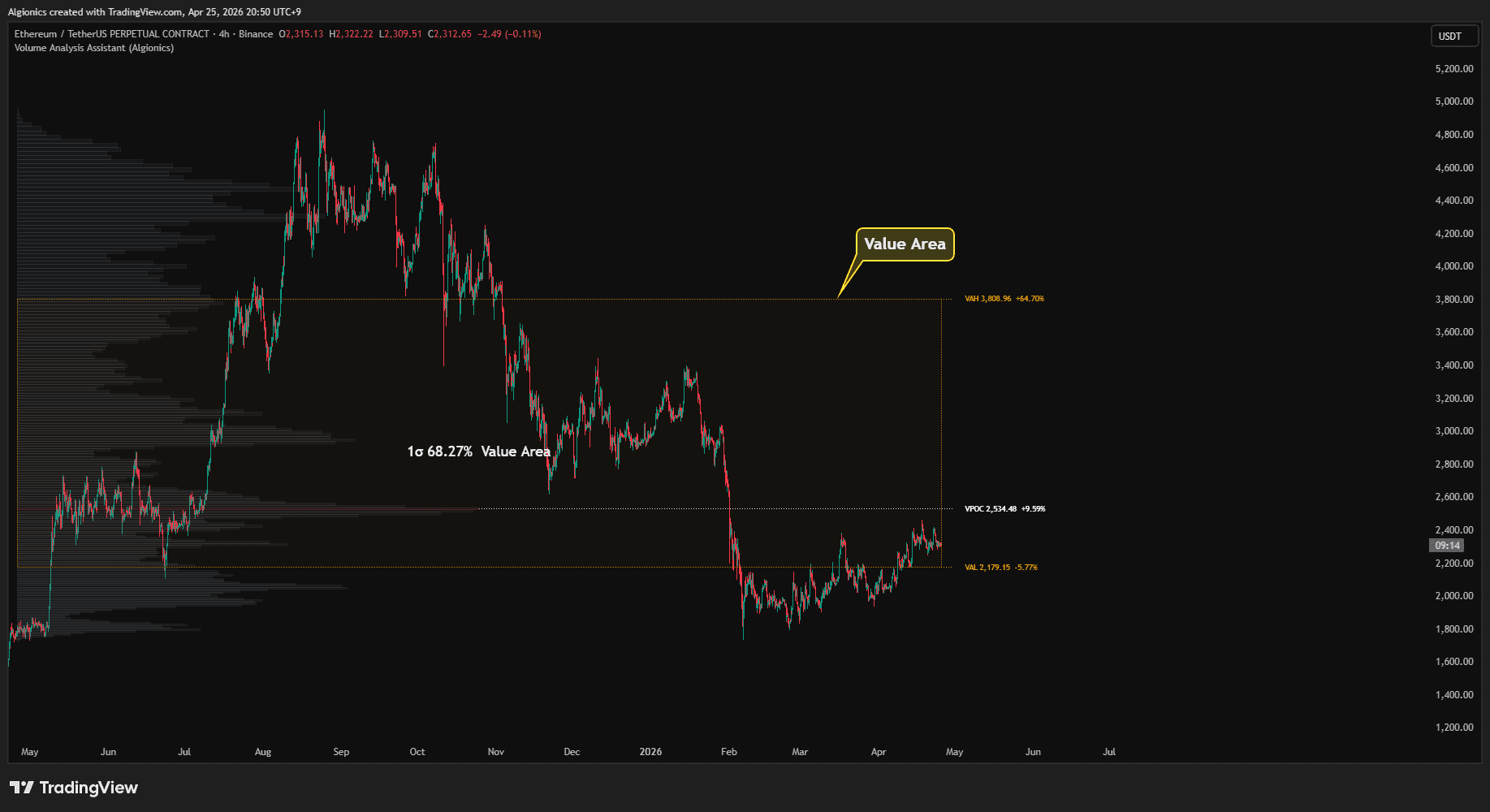
Both edges extend as dotted lines to the right of the chart, each carrying a label that shows the exact price and the percentage distance from the current price.
A center label inside the box reads "1σ 68.27% Value Area" to indicate the statistical span being displayed.
Traditional volume profile uses a 70% Value Area, but we could not find a clear mathematical basis for that specific number.
Our approach reaches a similar result through a stricter mathematical path. The Value Area is defined as the volume-weighted mean ± 1 standard deviation in log-price space, which covers exactly 68.27% of the distribution by definition. The number is derived, not chosen.
HVN / LVN
HVN and LVN mark structural extremes within the volume profile.
HVN (High Volume Node) is a price region where volume, reversal activity, and price residence all concentrate together. LVN (Low Volume Node) is a region where all three thin out.
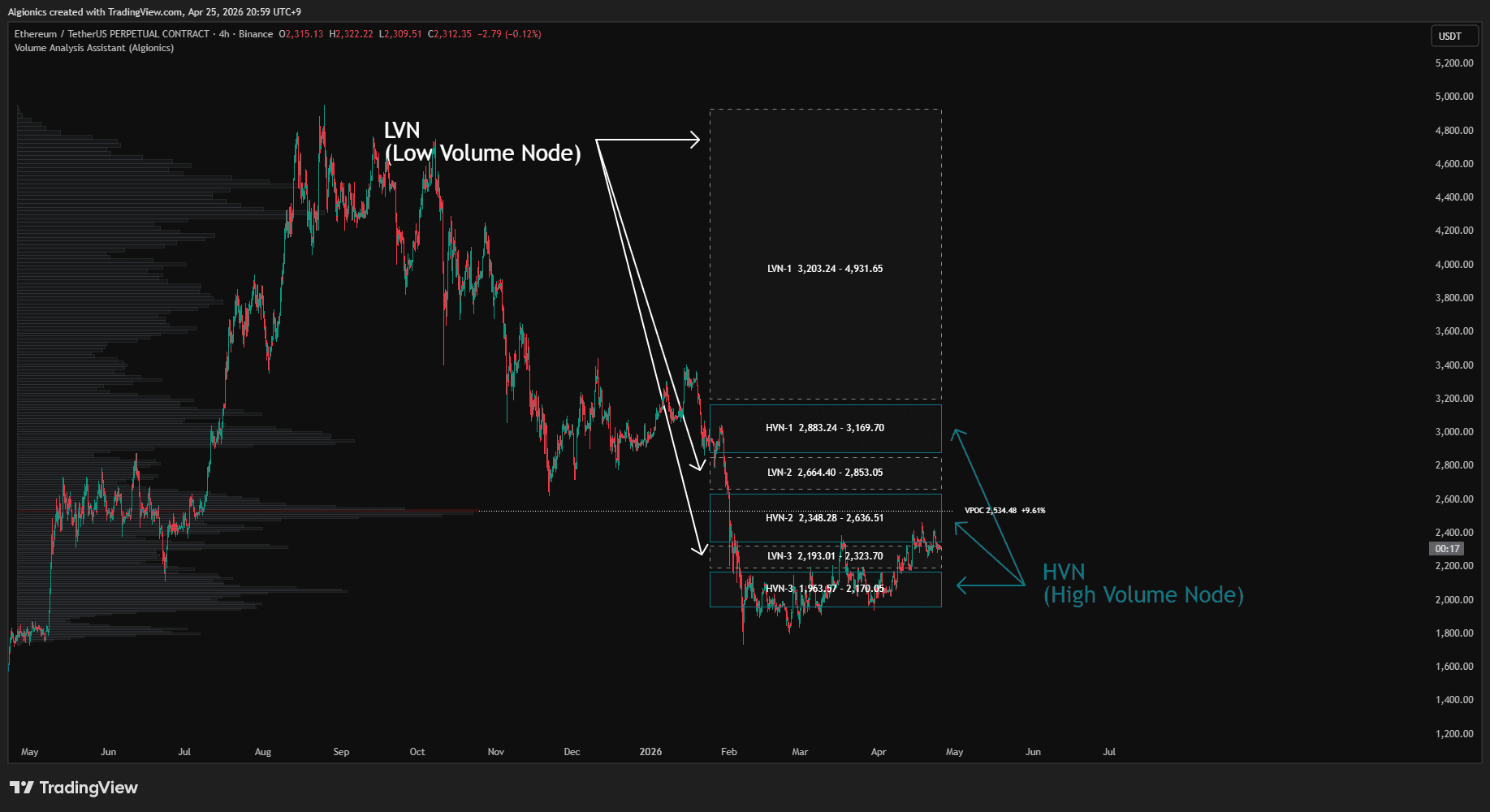
Each zone is drawn as a horizontal box anchored to the right edge of the chart, with a label at the center showing its name and full price range. Up to three HVNs and three LVNs are displayed, ranked by structural strength.
HVN (High Volume Node)
HVN regions are filled in the HVN color and represent areas where the market has historically agreed on price.
These zones tend to act as gravitational centers. Price entering an HVN often consolidates as participants on both sides find acceptance.
HVN (Low Volume Node)
LVN regions are drawn with a dotted border and represent areas where the market has historically rejected price.
These zones tend to act as transit corridors. Price entering an LVN often moves through quickly because there is little volume to support a stop.
Market Trend & Drift
Market Trend and Market Drift are two polylines drawn at the bottom of the chart, each measuring a different aspect of price behavior across the lookback window.
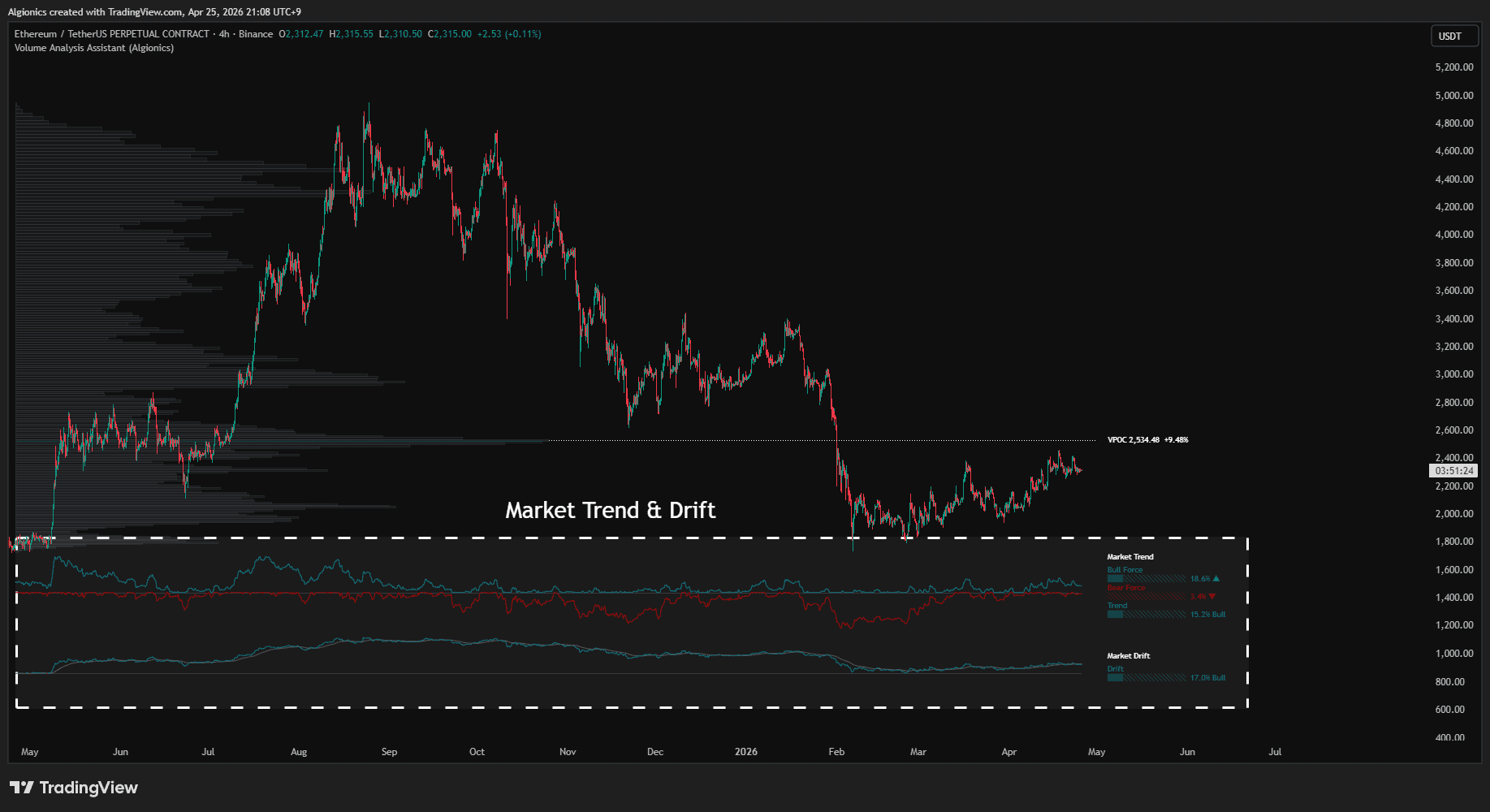
Both are accompanied by labels on the right side of the chart that show the current reading, a segmented bar visualization, and a directional arrow.
Market Trend
Market Trend tracks the dominant force in the market.
It plots two polylines, one in bull color showing the upward force, one in bear color showing the downward force. The two forces are measured against the same baseline, so their relative heights show which side is in control.
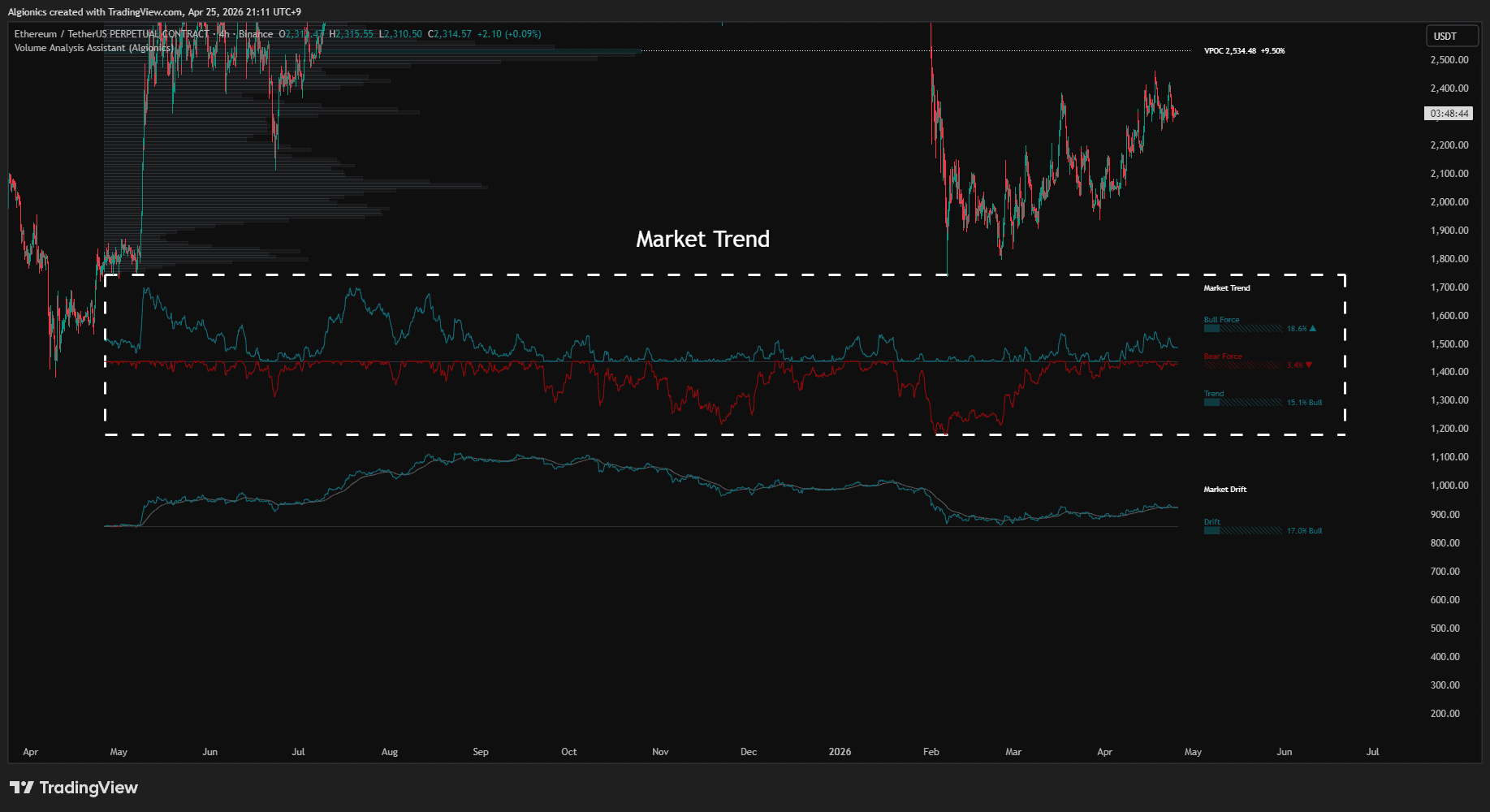
The label section displays three values. Bull Force shows the current upward pressure on a 0 to 100% scale. Bear Force shows the current downward pressure on the same scale. Trend shows the net difference, with the dominant side labeled as Bull or Bear.
A rising arrow indicates the value is increasing, a falling arrow indicates it is decreasing.
Market Drift
Market Drift tracks the cumulative net movement of price across the lookback window.
It plots a single polyline that switches between bull and bear color depending on whether the cumulative return is positive or negative at each point. A smoothed reference line runs alongside in neutral gray.
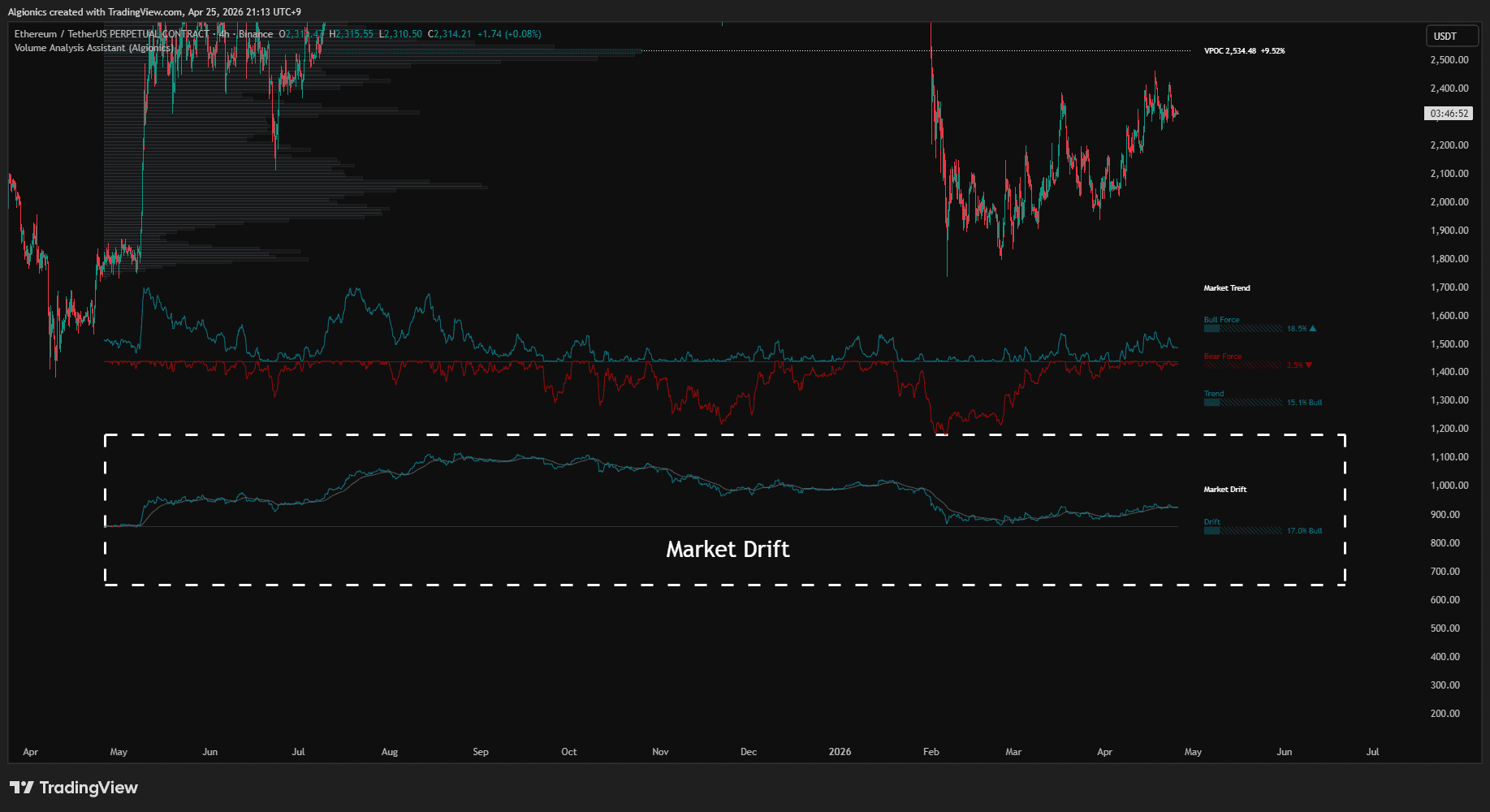
The label shows the current drift as a normalized percentage, with the dominant direction labeled as Bull or Bear. Bull Force, Bear Force, and Trend describe the present moment. Drift describes the path taken to get here.
Equilibrium Line
The Equilibrium Line is a single line drawn directly on the price chart that tracks the market's dynamic center of balance.
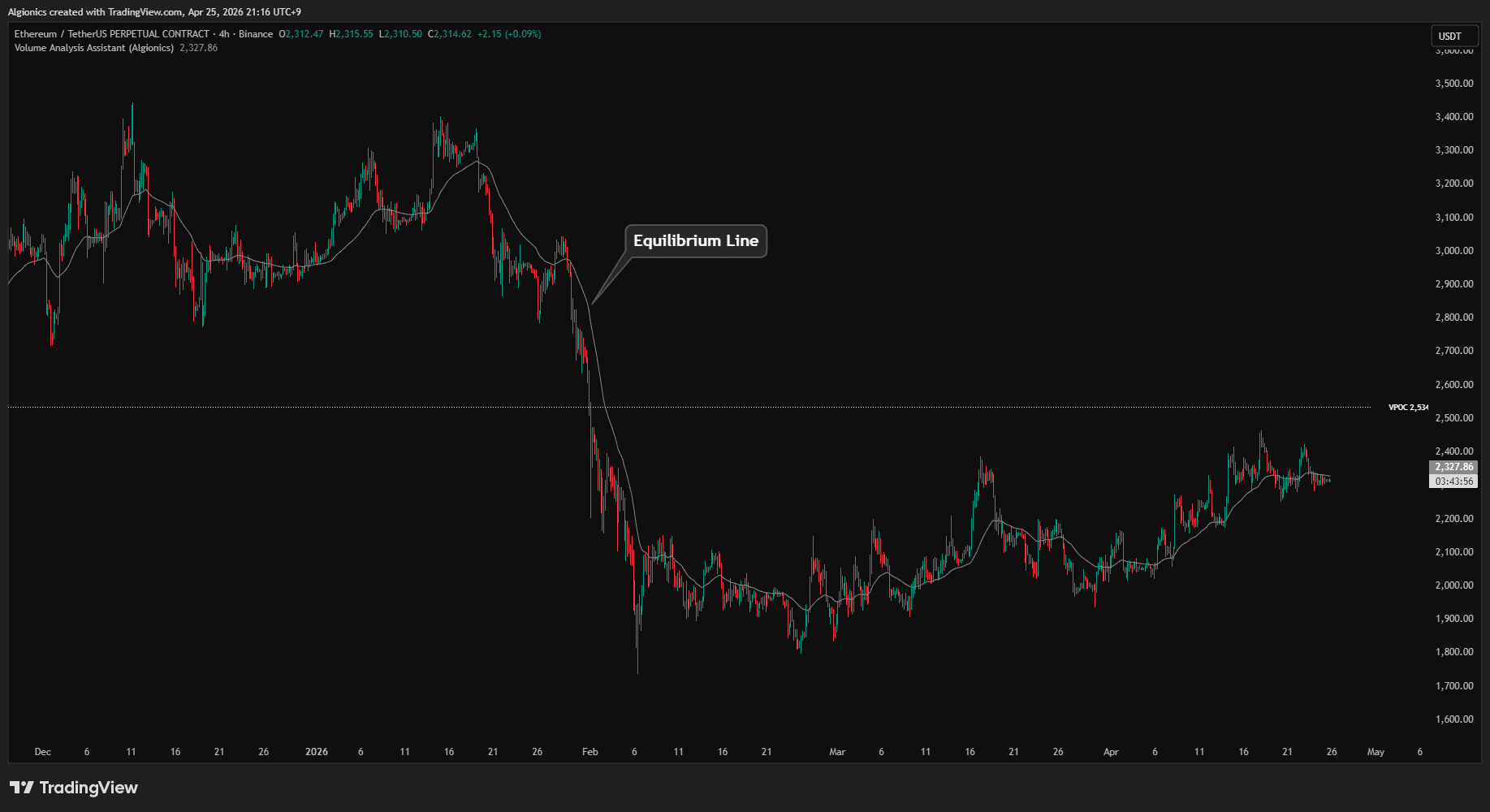
It behaves like a moving average, but its responsiveness adjusts to current volatility conditions. When volatility expands, the line tightens its grip on price and reacts faster. When volatility contracts, the line loosens and tracks more slowly.
This produces a single reference line that stays close to price during calm periods without lagging during sharp moves.
The line is rendered as a thin solid stroke and stays continuous across the chart. Price crossing above suggests upward bias relative to recent balance. Price crossing below suggests downward bias.
Resonance Channel
The Resonance Channel is a regression channel anchored to the period in which the market is most internally aligned.
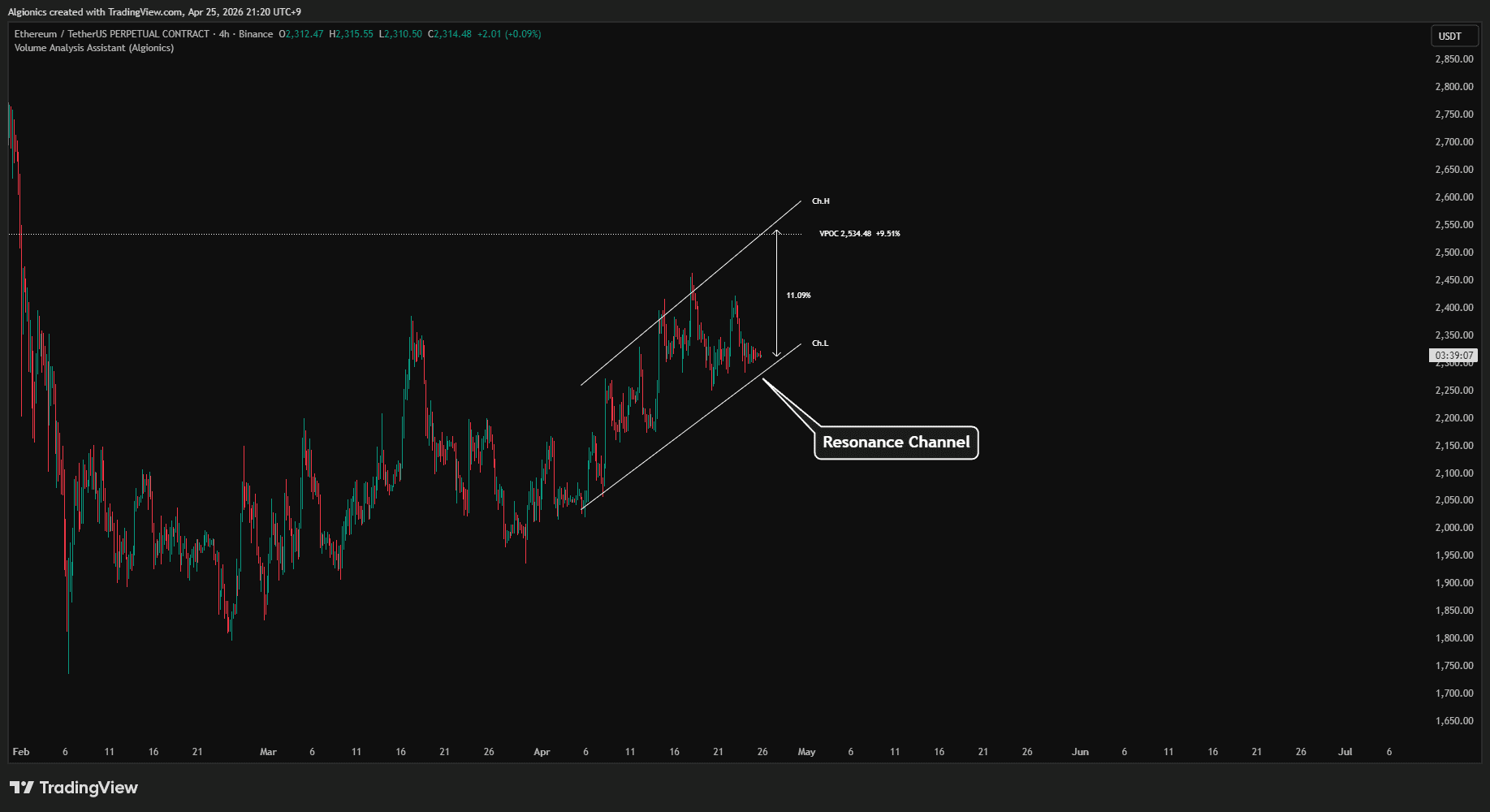
Two parallel lines are drawn at the top and bottom of the channel, labeled Ch.H and Ch.L, extending toward the right edge of the chart. A double-headed arrow inside the channel shows the current channel width as a percentage.
The channel is built in log-price space, so its slope reflects geometric growth rather than linear movement. The boundaries sit at ±2σ around the regression line, which means roughly 95% of price action under that period's behavior should remain inside the channel.
Why Resonance
The channel does not use a fixed lookback period. It scans across multiple internal timeframes and selects the one in which the underlying ribbon is most compressed.
A compressed ribbon means the market is moving in unison across short, medium, and long horizons. This is the period in which a regression line carries the most signal and the least noise.
By anchoring to that period, the channel captures the structure the market is actively respecting, rather than imposing an arbitrary window length.
Liquidity
(BSL / SSL with BOS / CHoCH)
Liquidity refers to price levels where stop orders accumulate.
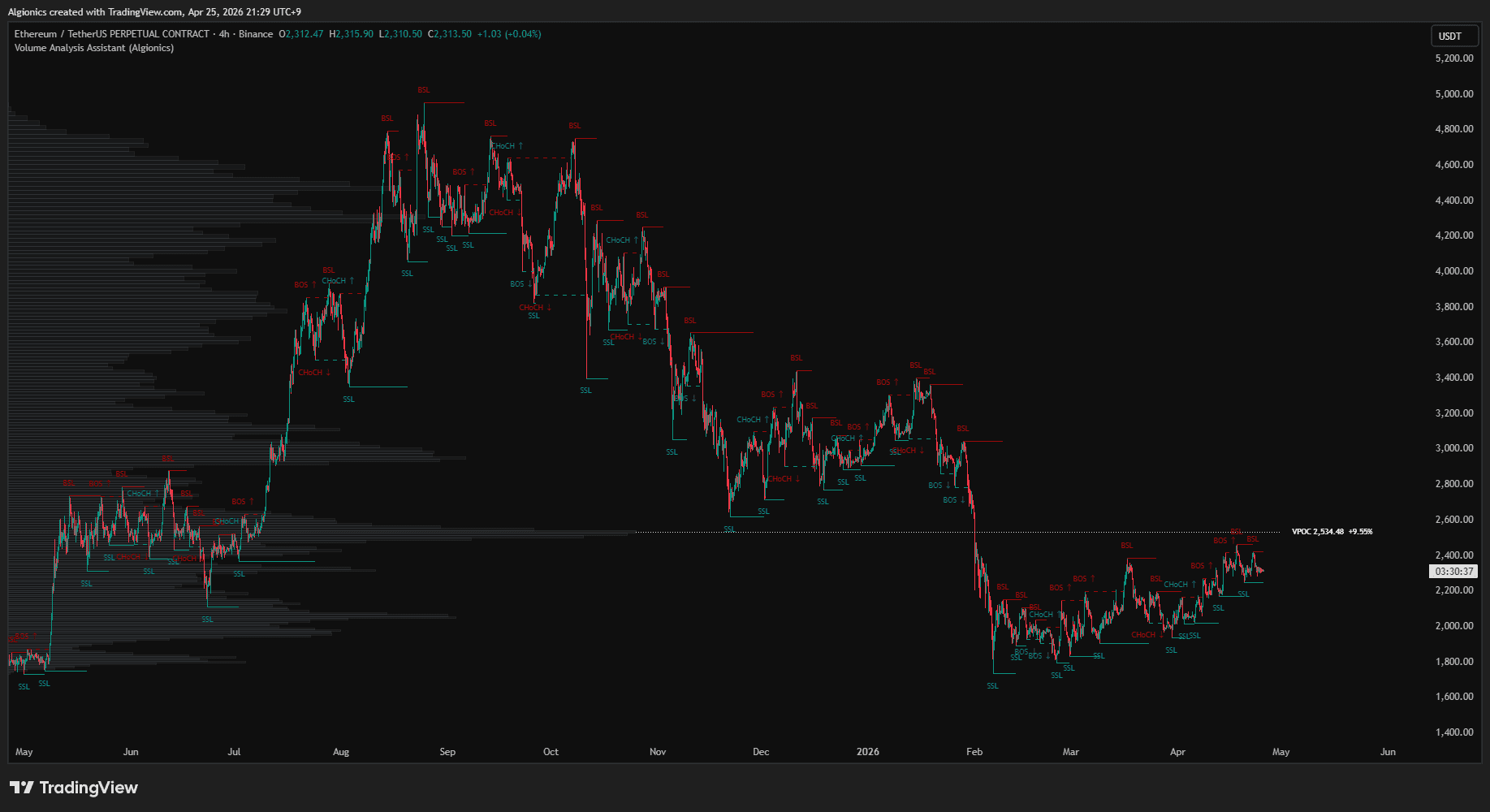
The indicator detects these levels and labels them as BSL or SSL. When price breaks through one, the break is classified as BOS or CHoCH.
BSL and SSL
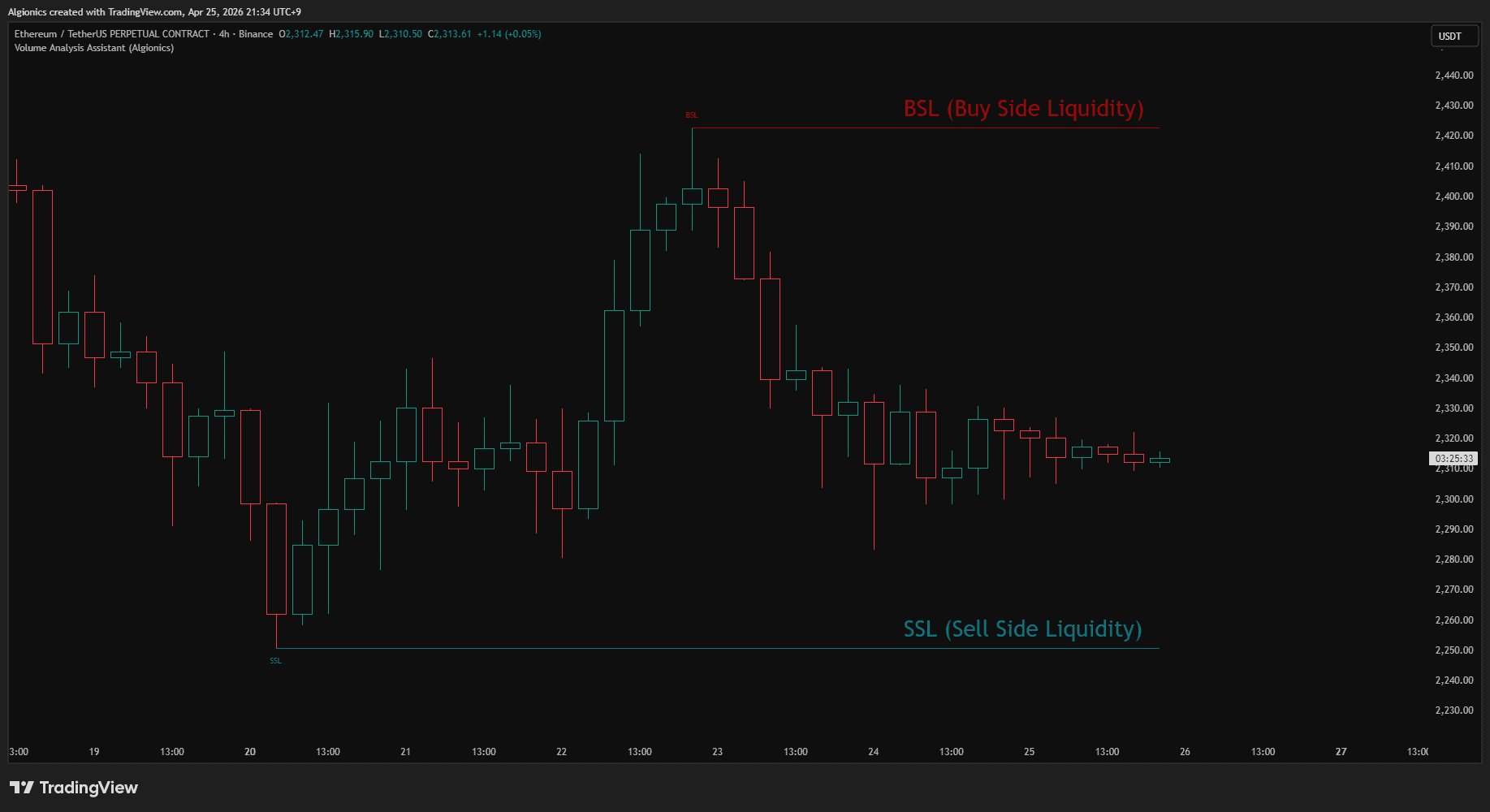
BSL (Buy Side Liquidity) marks a price high where buy stops are likely resting, drawn in bear color.
SSL (Sell Side Liquidity) marks a price low where sell stops are likely resting, drawn in bull color.
Each line carries a label at its left end. The tooltip shows the bull/bear volume composition built up at that level and the number of times price has touched it.
Detection Logic
Levels are detected through two parallel paths. The first tracks ribbon dynamics, confirming a level once the fastest line breaks the ribbon envelope and price stops making new highs or lows. The second tracks standard pivot highs and lows.
Both paths feed into the same level system, producing a more complete liquidity map than either method alone.
BOS and CHoCH
When price closes through an active level, it is re-rendered as a dashed line and labeled.
BOS (Break of Structure) means the break continues in the same direction as the previous break.
CHoCH (Change of Character) means it reverses the previous direction.
BOS uses the level's original color. CHoCH uses the opposite color to signal the directional shift.
Analysis Dashboard
02
Market Summary
Market Summary sits at the top of the dashboard and shows where the market stands right now.
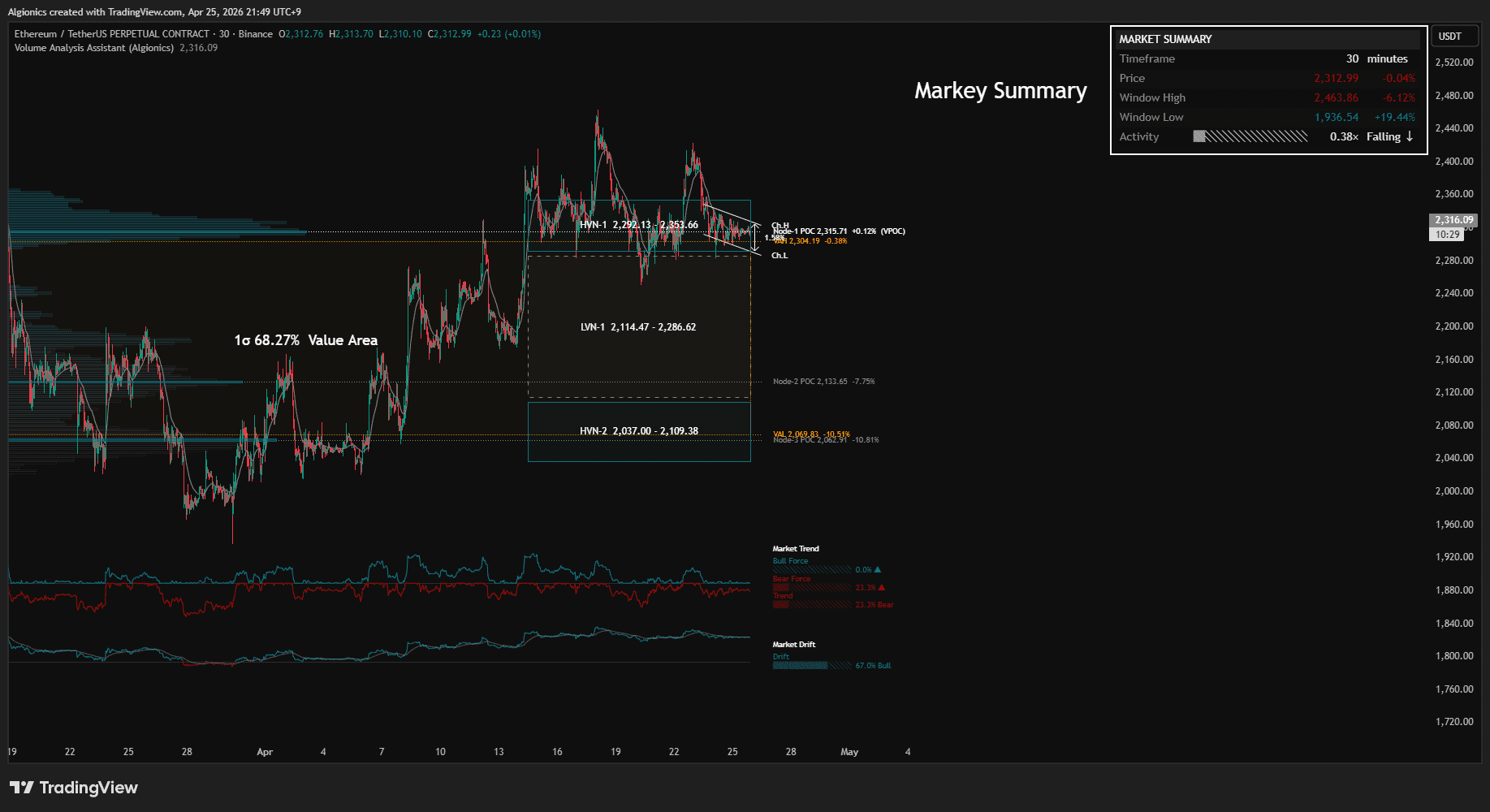
Five rows are displayed.
Timeframe shows the current chart's interval.
Price shows the current price along with its percentage change from the previous daily close.
Window High and Window Low show the highest and lowest prices reached within the lookback window, each with the percentage distance from the current price.
Activity shows current trading volume relative to the lookback average. A reading above 1× means volume is running hotter than the window's average, below 1× means cooler. The trailing label indicates whether the value is rising or falling.
Window
Window shows the size of the lookback window and how much time it covers.
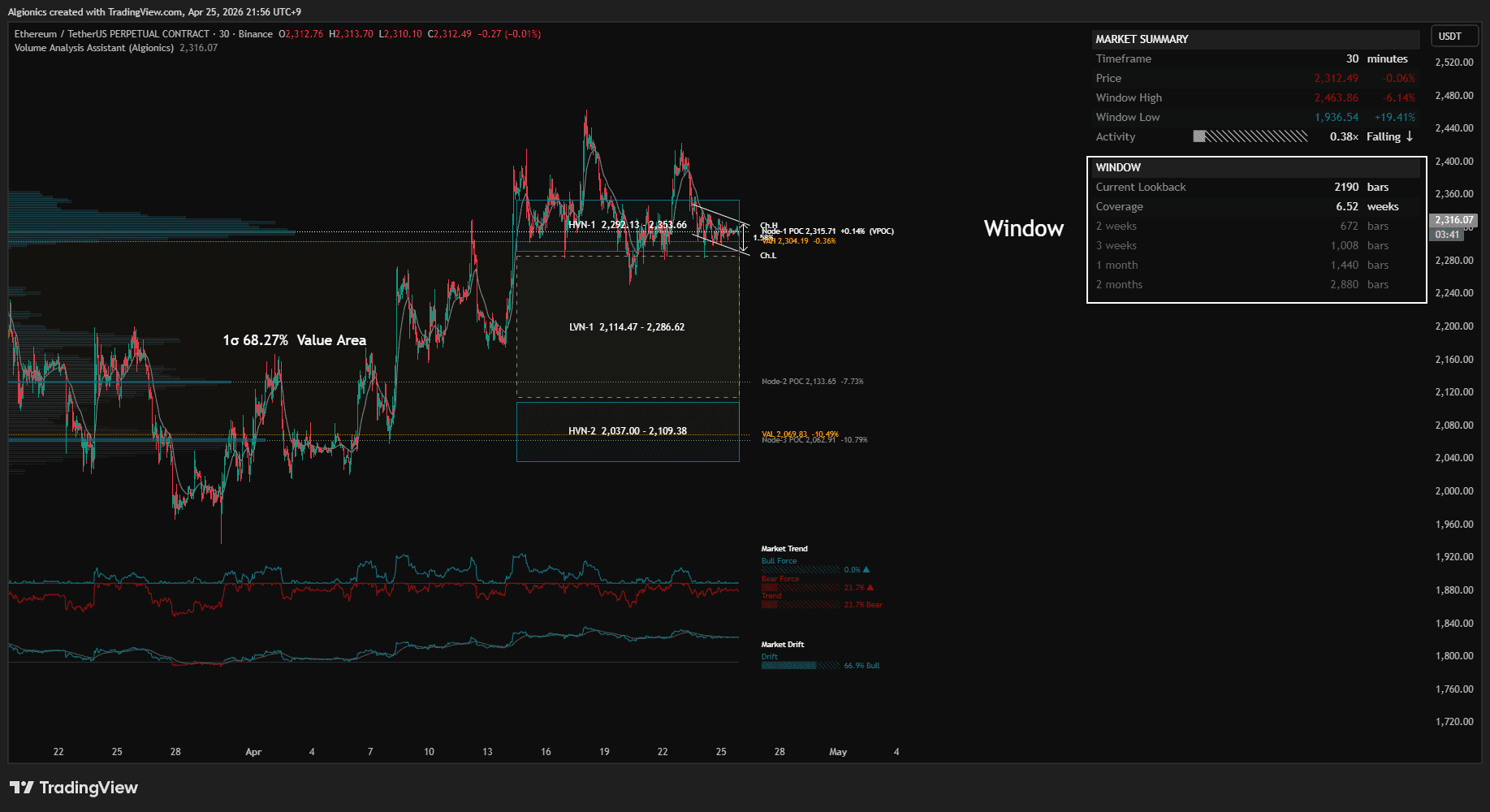
Current Lookback shows the number of bars currently being analyzed.
Coverage translates that bar count into a time span (days, weeks, months, or years) based on the current timeframe.
Below these, four reference rows show common time spans (such as 1 week, 1 month, 3 months, 1 year) and how many bars each would correspond to on the current timeframe.
These references are provided as a guide. If the current lookback feels too narrow or too wide, the reference rows show what bar count to enter to match a familiar time span.
Volume Zone Map
Volume Zone Map shows every key price level in the lookback window, sorted by price, with the current price slotted in among them.
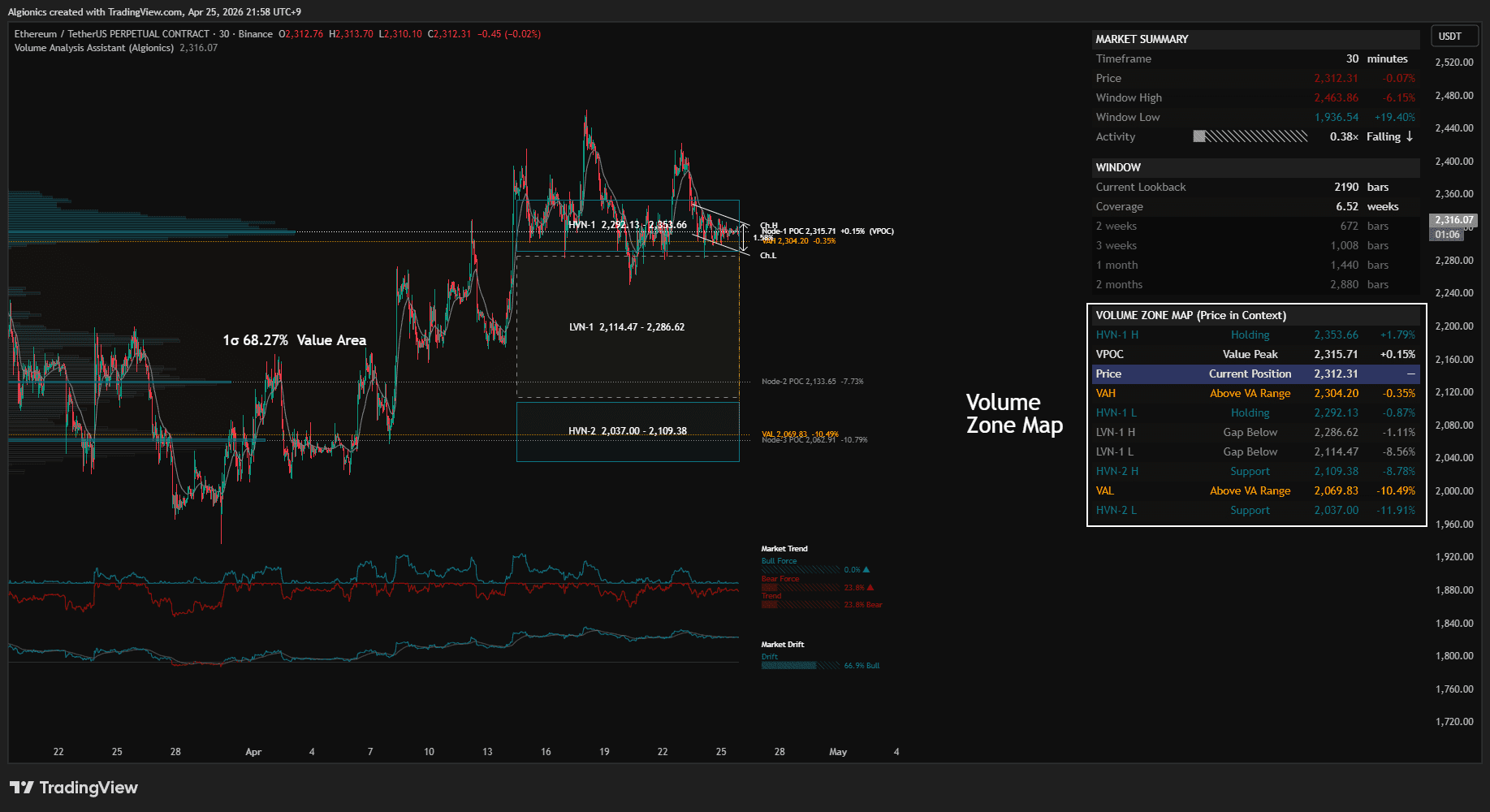
Each row contains four columns: the level name, its current status, the price, and the percentage distance from the current price.
The price row is highlighted with a distinct background and marks where the current price sits within the structure.
Levels Displayed
VAH, VAL, and VPOC mark the boundaries and peak of the value distribution.
HVN H and HVN L mark the high and low edges of each detected high volume node. Up to three HVNs are tracked, numbered by position.
LVN H and LVN L mark the high and low edges of each detected low volume node. Up to three LVNs are tracked, numbered by position.
Status Column
The status column reads each level against the current price.
For VAH and VAL, status shows whether price is inside, above, or below the Value Area.
For HVN edges, status shows whether the level is acting as Support, Resistance, or Holding (when price is currently inside that node).
For LVN edges, status shows Gap Above, Gap Below, or Transit (when price is currently inside that gap).
For VPOC, status shows Value Peak.
For Price, status shows Current Position.
The full list lets you see, at a glance, where price sits relative to every meaningful structural level in the window.
Analysis
Analysis sits at the bottom of the dashboard and translates the raw structural data into plain language.
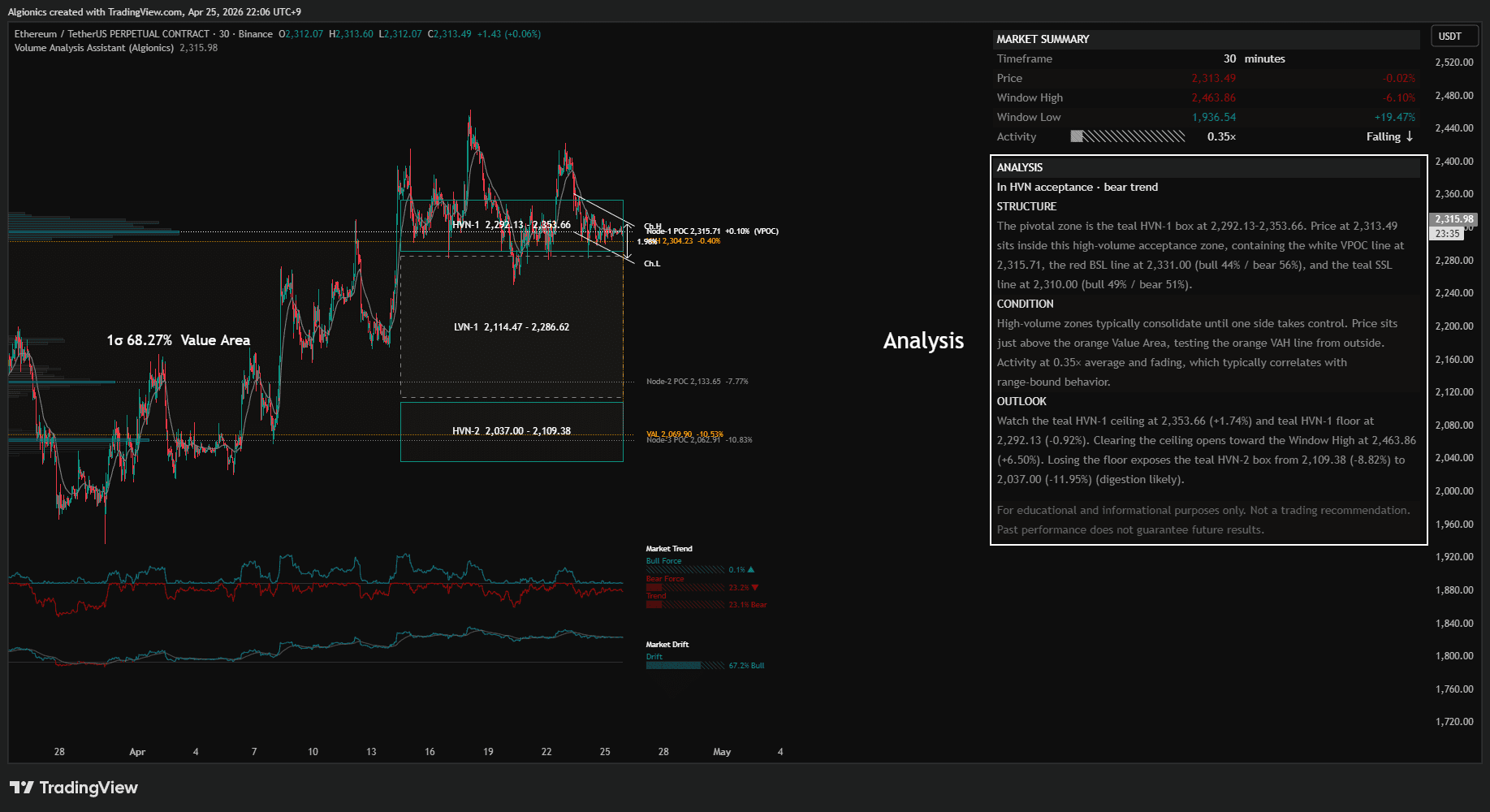
It is divided into four parts: Headline, Structure, Condition, and Outlook. Each part addresses a different layer of the same question, where price stands and what it might do next.
Headline
Headline is a single line that summarizes the current state.
It combines two readings: where price sits within the volume structure (such as "In HVN acceptance" or "Below VA extended") and what the dominant force is doing (such as "bull trend" or "structure shift ↑").
This gives an immediate read on the state of the market without requiring you to parse the rest of the section.
Structure
Structure identifies the most relevant zone or level around the current price and describes what sits inside or near it.
When price is inside a volume zone, Structure names that zone, gives its price range, and lists any other levels (VPOC, BSL, SSL) contained within it.
When price is in open space between zones, Structure identifies the nearest barrier as the pivotal level to watch.
Condition
Condition describes the current behavioral state of the market.
It draws on three inputs: the typical behavior of the zone price is currently in (consolidation, transit, or rotation), the activity level relative to the lookback average, and any recent BOS or CHoCH events.
This gives context for why price may be behaving the way it is right now.
Outlook
Outlook describes the immediate path of least resistance.
It identifies the ceiling and floor of the current zone (or pivot level), then names what lies beyond each boundary if price clears or loses it.
The result is a forward-looking sketch grounded in actual structure rather than prediction.
Technical Identity
03
Log-Space Profiling
Volume Analysis Assistant operates entirely in logarithmic price space. Every row in the histogram is spaced by equal ratios rather than equal dollar amounts, so the same percentage move receives the same visual weight whether the price is 10 or 10,000.
This eliminates distortion that linear-scale profiles introduce on assets with wide price ranges.
Gaussian Volume Distribution
Volume from each bar is distributed across price rows using a Gaussian kernel centered on the bar's typical price. Rows near the middle of the bar receive more weight, rows at the edges receive less.
The standard deviation of the kernel is derived from the bar's high-low range, so wider bars distribute more broadly and tighter bars concentrate more sharply. The result is a smoother, more realistic density curve than flat distribution methods.
σ-Based Value Area
The Value Area is defined as the volume-weighted mean ± 1 standard deviation in log-price space. This covers exactly 68.27% of the distribution by definition.
Traditional volume profile uses 70%, a number we could not trace back to a clear mathematical foundation. The σ-based approach reaches a comparable result through a stricter path. The number is derived, not chosen.
Gravity-Derived HVN / LVN
HVN and LVN are not detected from volume alone. Each price row is scored on three independent factors: total volume, reversal frequency (the number of pivot points formed at that row), and price residence (the number of bars that traversed that row).
The three factors are normalized and multiplied together to form a gravity score. HVN regions emerge where all three concentrate. LVN regions emerge where all three thin out.
This is structurally stronger than single-factor detection because it requires agreement across volume, behavior, and time.
ATR-Normalized Force
Bull Force and Bear Force are not absolute values. Each is divided by the current ATR, which strips out the asset's natural volatility scale before measurement.
The result is a comparable reading across assets and timeframes. A force value of 80% means the same thing on a low-volatility stock and a high-volatility crypto pair.
Volatility-Adaptive Equilibrium
The Equilibrium Line uses an adaptive smoothing constant α that scales with the ratio of fast ATR to slow ATR. When volatility expands, α increases and the line tightens its grip on price. When volatility contracts, α decreases and the line loosens.
This produces a single reference line that stays close to price during calm periods without lagging during sharp moves. No fixed period is chosen.
Compression-Selected Resonance
The Resonance Channel does not use a fixed lookback period. It evaluates 25 internal timeframes spanning short to long horizons, scoring each by how compressed the underlying ribbon is at that length.
The most compressed length is selected as the regression anchor. A compressed ribbon means the market is moving in unison across multiple horizons, which is the period in which a regression line carries the most signal and the least noise.
The channel adapts its own window length based on what the market is actually respecting.
Dual-Path Liquidity with Auto-Classified Breaks
Liquidity levels are detected through two parallel paths. The first tracks ribbon dynamics, confirming a level after the fastest line breaks the ribbon envelope and price stops making new highs or lows for a period derived from the cycle structure. The second tracks standard pivot highs and lows.
When price closes through an active level, the break is classified automatically. If it continues in the same direction as the previous break, it is labeled BOS. If it reverses the previous direction, it is labeled CHoCH.
The dual-path detection produces a more complete map than either method alone. The auto-classification eliminates the manual labeling that other systems require.
Incremental Profile Updates
After the first build, the volume profile is not rebuilt from scratch on every bar. Newly confirmed bars are added to the existing distribution, and bars that fall outside the lookback window are subtracted from it.
This converts what would be a full rebuild on every update into a constant-time operation. The profile stays current without paying the cost of a fresh computation each bar.
Object Pool Architecture
Drawing objects (boxes, lines, labels, polylines) are pre-allocated into pools and recycled across render cycles. When the profile updates, existing objects are repositioned rather than destroyed and recreated.
This eliminates the garbage accumulation that causes most TradingView indicators to slow down over time, and keeps resource usage flat regardless of how long the chart has been open.
Single-Pass Computation
All heavy computation (profile construction, node detection, gravity scoring, HVN/LVN region growth, value area derivation, dashboard analysis) executes exactly once per render frame. Intermediate buffers are pre-allocated and zeroed in place rather than reallocated.
The result is an indicator that performs dense analytical work (Gaussian distribution, three-factor gravity, dual-path liquidity, natural-language synthesis) while rendering at speeds comparable to far simpler indicators.
Zero Configuration
Every numerical parameter in the system traces back to either market data or the cycle structure. ATR length, smoothing radius, watch periods, slow line lengths, and detection windows are all derived rather than chosen.
The indicator adapts to whatever market, timeframe, and lookback you give it. Nothing is hardcoded.
Settings
04
General Settings
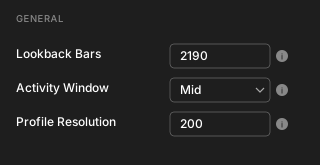
Lookback Bars sets the number of bars used for all calculations across the indicator. Higher values produce broader structural context, lower values focus on recent behavior. The default is 1000.
Activity Window sets the size of the recent window used for the dashboard's Activity reading. Three options scale from the lookback window: Short, Mid, and Long. Shorter windows react faster to volume changes. The default is Mid.
Profile Resolution controls how many price rows the volume profile uses. Higher values produce finer detail. The default is 200.
Chart Overlays
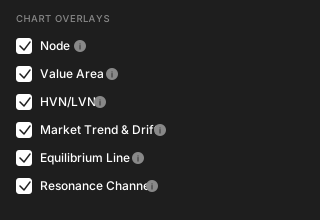
Node toggles the segmented volume profile clusters with their POC labels and extension lines.
Value Area toggles the σ-based Value Area box, VAH/VAL boundary lines, and labels.
HVN/LVN toggles the High Volume Nodes (volume clusters) and Low Volume Nodes (volume voids) on the chart.
Market Trend & Drift toggles the Bull Force, Bear Force, Trend, and Drift polylines along with their dashboard readouts.
Equilibrium Line toggles the volatility-adaptive equilibrium line on the price chart.
Resonance Channel toggles the compression-selected regression channel with its ±2σ deviation bands.
Liquidity
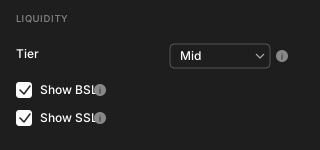
Tier sets the detection sensitivity for liquidity levels. Two options are derived from the cycle structure: Short uses cycleLength^(1/4), Mid uses cycleLength^(1/3). Shorter tiers produce more levels with finer detail, longer tiers focus on fewer, more significant levels. The default is Mid.
Show BSL toggles Buy Side Liquidity lines, which mark price highs where buy stops are likely resting.
Show SSL toggles Sell Side Liquidity lines, which mark price lows where sell stops are likely resting.
Dashboard
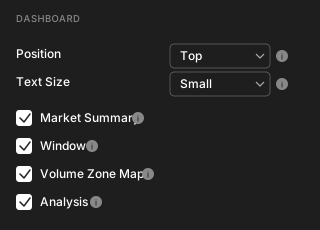
Position sets the vertical placement of the dashboard on the right side of the chart. Three options are available: Top, Middle, and Bottom. The default is Top.
Text Size sets the dashboard text size. Small saves screen space, Normal is easier to read. The default is Small.
Market Summary toggles the section that displays Timeframe, Price, Window High, Window Low, and Activity.
Window toggles the section that displays the current lookback size, time coverage, and reference window sizes.
Volume Zone Map toggles the section that displays VAH, VAL, VPOC, HVN, LVN, and current price sorted by price with status indicators.
Analysis toggles the section that displays the natural-language interpretation of price location, structure, condition, and outlook.
Tips
05
HVN as Magnet, LVN as Highway
HVN regions and LVN regions behave in opposite ways.
When price enters an HVN, it tends to slow down and consolidate. The market has historically agreed on this range, so participants on both sides find acceptance and trade settles into rotation.
When price enters an LVN, it tends to move through quickly. There is little volume to absorb pressure or hold a stop, so price travels until it reaches the next structure.
Use HVNs as zones where positions can be built or unwound with less slippage. Use LVNs as zones to enter or exit before price arrives, not after.
CHoCH Marks the Turn, BOS Marks the Continuation
Every break of a liquidity level is automatically labeled as either BOS or CHoCH.
BOS means the break continues in the direction of the previous break. The current trend is intact and the move is extending.
CHoCH means the break reverses the previous direction. Structure has shifted, and what was support may now be resistance (or vice versa).
A sequence of BOS labels confirms a trend in motion. A CHoCH label is the earliest structural signal that the trend may be ending.
Read the Pivotal Zone First
The Analysis section identifies a pivotal zone (or level) on every bar.
When price is inside an HVN, LVN, or Value Area, that zone is the pivot. When price is in open space, the nearest barrier becomes the pivot.
This zone is the anchor for everything else in the analysis. The OUTLOOK section then describes what happens if price clears the ceiling or loses the floor of that zone.
Read the pivotal zone first to know where the market is. Then read the OUTLOOK to know where it can go.
Activity Confirms the Move
The Activity reading in Market Summary shows whether trading volume is running hotter or cooler than the lookback average.
A breakout supported by Activity above 1× and rising tends to follow through. A breakout that occurs while Activity is below 1× or falling often fades.
Use Activity as a confirmation filter. When a BOS or CHoCH occurs with strong Activity, the structural shift carries weight. When it occurs with weak Activity, treat it with caution.
Compression Precedes Expansion
The Resonance Channel displays its current width as a percentage in the center of the channel.
Narrow channel widths mean the market is internally compressed across multiple horizons. Compression is followed by expansion. The narrower the channel, the closer the market may be to a decisive move.
Wide channel widths mean expansion is already underway. The trend is in motion and the channel is tracking it, rather than predicting it.
Match Lookback to the Question
The Lookback Bars setting determines the scale of every measurement in the indicator.
If you are studying recent structure, use a shorter lookback. The Window section's reference rows show how many bars match common time spans on your current timeframe.
If you are mapping major levels, use a longer lookback to capture historical HVN, LVN, and liquidity zones.
Match the window to the question you are asking. The same chart will tell different stories at different lookbacks, and all of them are valid for different purposes.